Three New Features: Custom Statuses, Japanese Holidays, and Excel Import
Ganty Team
Ganty adds three features: custom statuses, a Japanese holiday calendar, and Excel / MS Project import. All are available on every plan.
1. Custom statuses → categories
Beyond the four built-ins (Not started / In progress / Done / On hold), you can now define your own statuses — “In review”, “QA”, “Closed” — and each maps to one fixed category.
The point: categories drive metrics, scheduling, and the board. So renaming or adding statuses never breaks your reports or board. Your board columns become exactly the statuses you defined. Set them up from “Edit statuses” at the top of the board.
2. Japanese holiday calendar
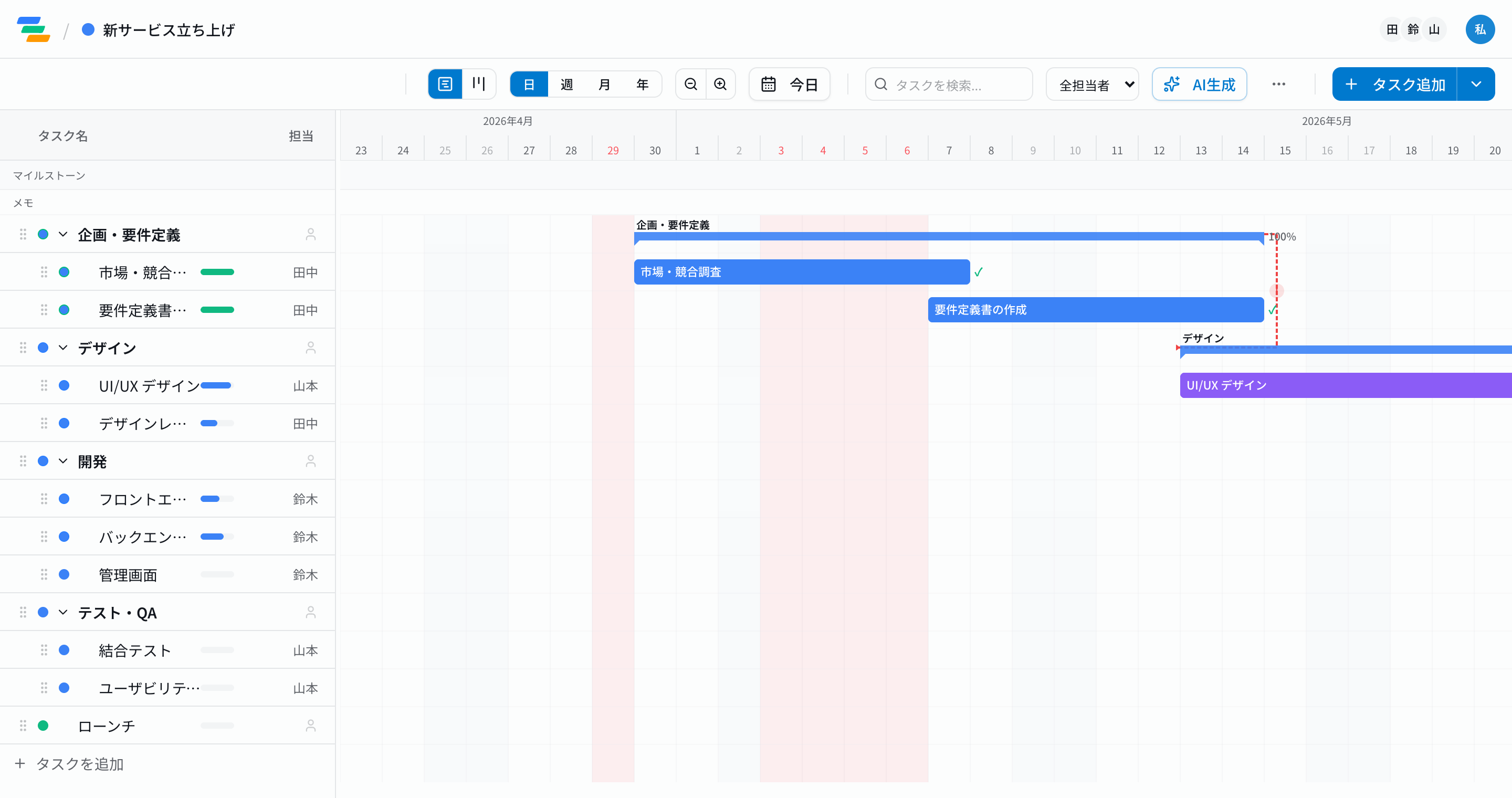
When you use Ganty in Japanese, national holidays are shaded on the timeline and dated in red — including substitute holidays and the citizens' holidays that appear during Silver Week. Business-day counts exclude holidays too.
In most non-Japanese tools, holidays are something you enter by hand. Ganty is built in Japan, so it knows the Japanese calendar out of the box. (Not applied in English mode.)
3. Excel / MS Project import
Export was there; now there's import. From the toolbar's "Export" menu, choose "Import from Excel", pick a file, and preview what will be imported before creating anything.
- Headers in the first row (Name / Start / End / Progress / Status / Assignee / Parent) are mapped automatically — Japanese, English, and MS Project exports supported.
- Ganty's own export (Task list) makes a clean round trip.
- Dates like
YYYY/MM/DDorMM/DD/YYYYand Japanese status labels are recognized.
Many teams still build their schedules in Excel. With import, they bring that work straight in. Moving from another tool also works via export → import.
Takeaway
Together, these three lower the bar for teams to move to Ganty — keep the status names you know, weave in the holidays that matter, and carry your Excel schedules across. Haven't tried it? Start from the no-signup demo and generate a Gantt from a single sentence.
Related Articles
Introducing Board View — a Kanban That Knows Your Schedule
Ganty now has a Board View. Switch the same tasks between the timeline (Gantt) and a status board. Drag cards to change status, and see due dates and overdue work at a glance — while scheduling stays on the Gantt side, so moving cards never breaks your plan.
2026-08-15Jooto Is Shutting Down: Choosing Your Next Tool (If You Need the Gantt Side)
Jooto ends general availability on July 31, 2027, and its sibling Gantt tool "Ganto" is set to be discontinued before launch. If you relied on the Gantt / scheduling side, you'll be picking a new tool. An honest look at how Jooto (Kanban-first) differs from Ganty, and how to move over (rebuild with AI).
2026-07-22Why AI-Generated Schedules Drift — and How to Tell If Yours Will
LLMs are bad at date arithmetic. That is why 'AI-generated Gantt chart' tools look clean at first but quietly drift as you make changes. Here are the three reasons schedules drift — dependency chains, progress-aware remaining duration, and business days — and how to tell whether a tool will hold up when you let AI drive.