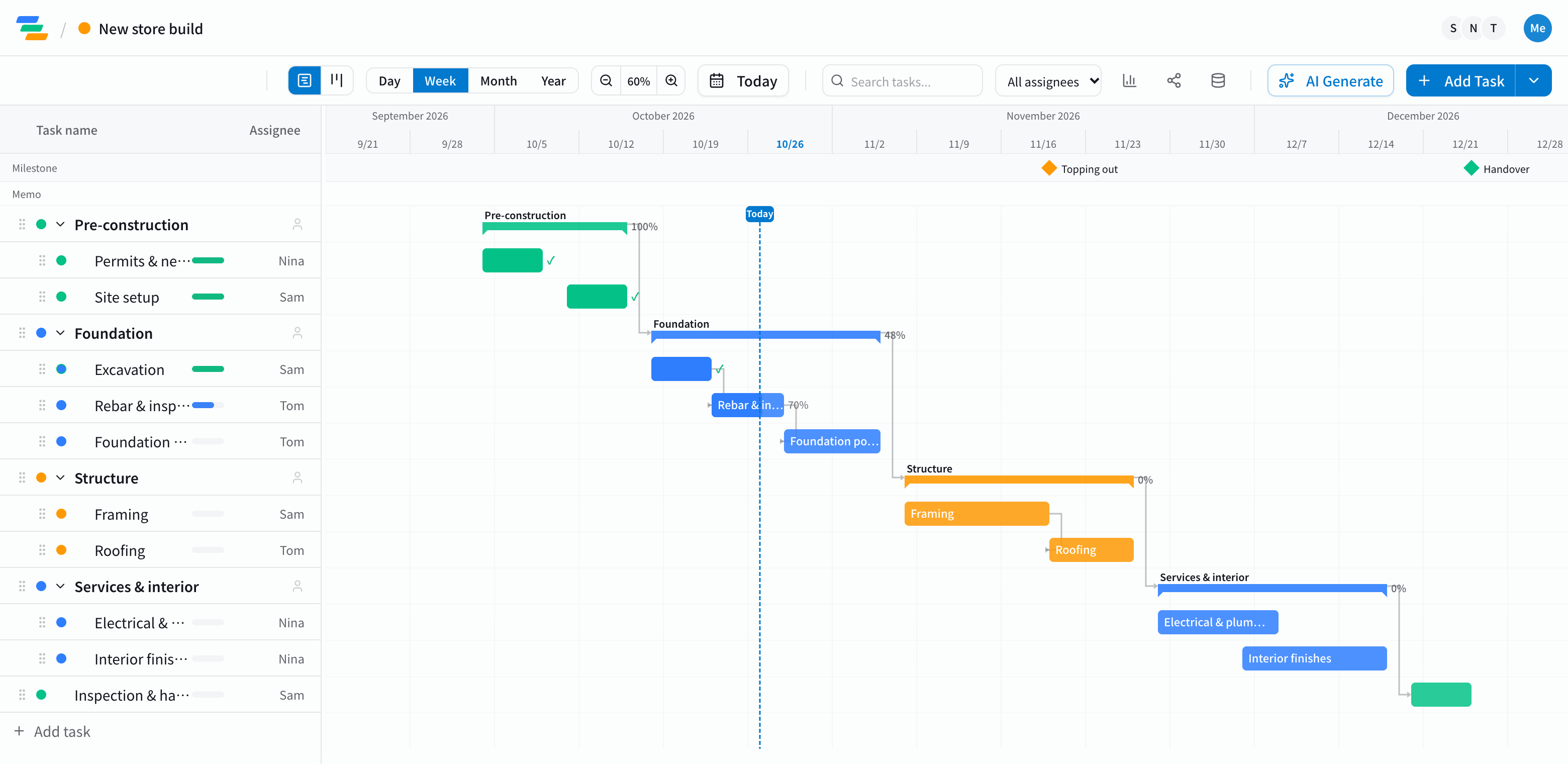
The main phases in a construction schedule
Every job is different, but most follow a flow like this. The template starts with this structure, so you can add or remove steps to match your site.
- Pre-construction: permits, notices to neighbors, site setup (hoarding, temporary power and water)
- Foundation: excavation, rebar and inspection, pouring and curing the concrete
- Structure: framing and roofing. Marking topping out as a milestone makes progress easy to read
- Services and interior: electrical, plumbing and interior finishes
- Inspection and handover: final inspection, snagging and handover
Link the phases with dependencies
The slowest part of keeping a schedule is redoing it when plans change. Some work can only start once something else is finished: you can't pour until the rebar is inspected, and you can't roof until the frame is up.
In Ganty you connect these with arrows. Drag an earlier task later and every task linked after it moves too. When rain adds two days to the foundation or materials arrive late, you can see the effect on handover right away.
Compared with a spreadsheet schedule
A spreadsheet works. The difference shows up when plans change often and when you share the schedule.
- Changes: in a spreadsheet you recolor each shifted cell; in Ganty you move one bar and the rest follow
- Sharing: send a share link and subcontractors or the client see the latest schedule without an account (view-only, on every plan)
- Export: export to Excel or PDF for meetings and submissions (Standard and above)
Draft the schedule with AI
Write one line such as "New two-story timber retail building, start in October, hand over in December" and the AI drafts a schedule with phases, durations and dependencies. Treat it as a starting point and adjust the durations and order to your site. You can also ask the AI to review a finished schedule and point out unrealistic dates or likely delays.
Getting started
- Sign up free and pick the construction schedule template (or have the AI draft one from a single line)
- Adjust names, dates and owners to your site, then link the phases with arrows
- Send a share link to your subcontractors. When plans change, just move the bar