"I built the Gantt chart, but I still can't see at a glance who's doing what or when." That frustration usually traces back to a missing color coding strategy. Color is processed by the brain faster than text or shape, so a well-designed scheme dramatically improves Gantt chart readability. Used carelessly, color does the opposite: it overwhelms the eye and turns the chart into noise. This article distills color coding for Gantt charts into seven practical principles.
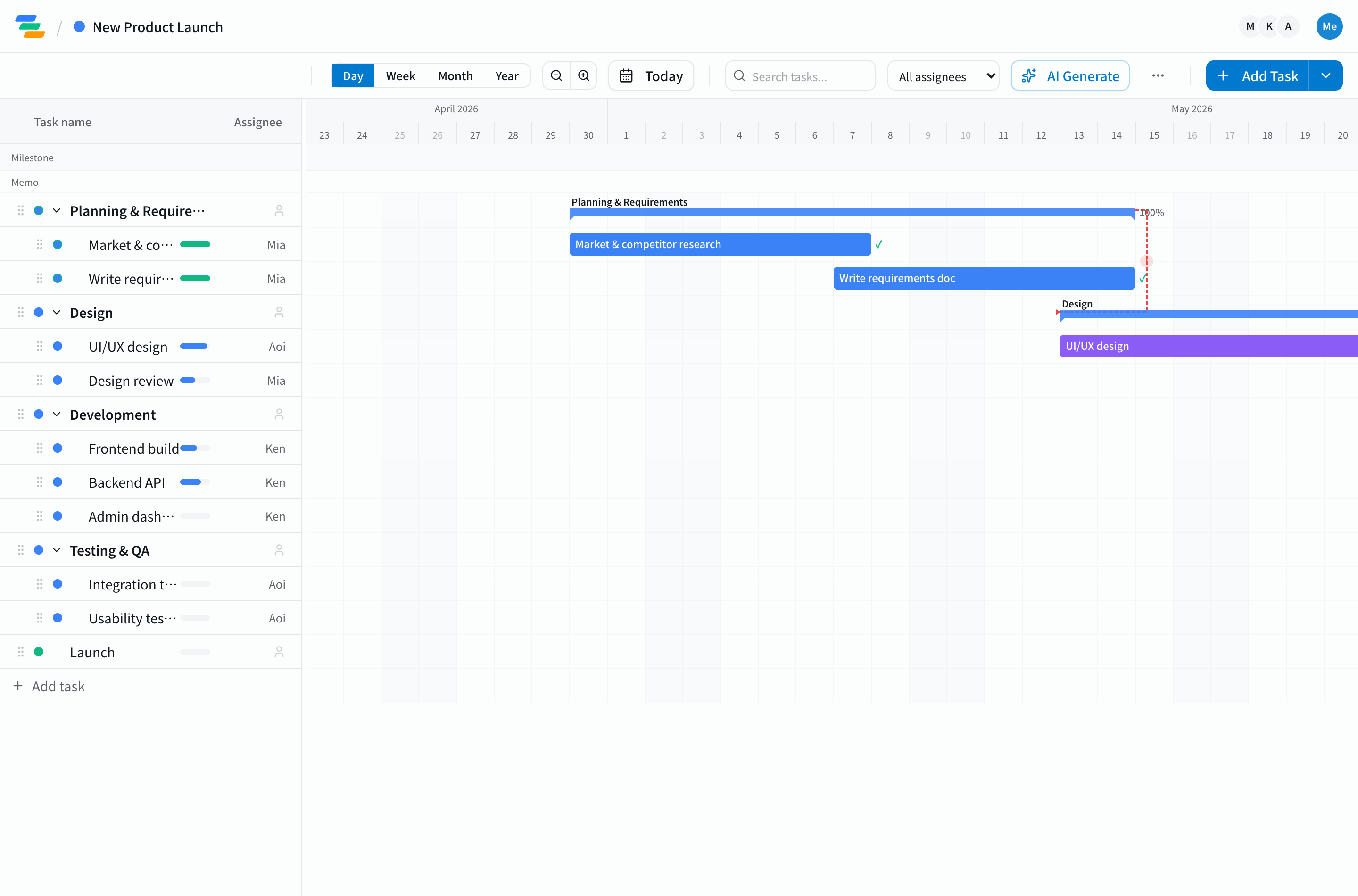
Why Color Coding Matters: Reducing Cognitive Load
The human brain identifies color in roughly 500 milliseconds — far faster than reading text. When a Gantt chart contains dozens or hundreds of tasks, the right color scheme lets viewers locate "my tasks," "delayed tasks," or "key milestones" almost instantly.
The essence of color coding is classification, not decoration. The first decision is what dimension to encode in color. Pair this article with our Gantt chart basics to keep the underlying structure in mind as you design colors.
Principle 1: Limit a Chart to One or Two Color Dimensions
Trying to color by assignee, priority, and status simultaneously creates a chart where no one knows what any color means. Pick at most two dimensions per chart. The common choices are:
- By assignee or team: Reveals workload concentration and resource imbalance at a glance.
- By priority: Makes high-priority work visually stand out. Pair with our task priority management guide.
- By status: Not started, in progress, delayed, done — surfaces problems immediately.
If you must use two dimensions, encode them differently — for example bar fill for one and bar outline for the other — so they remain visually distinct.
Principle 2: Choose Meaningful Colors (Color Symbolism)
Colors carry cultural and intuitive meaning. Going against those associations creates friction and makes the scheme hard to remember.
- Red: Warning, delay, urgency, importance.
- Yellow / Orange: Caution, needs review, medium priority.
- Green: On track, complete, safe.
- Blue: Default, informational, neutral.
- Gray: Not started, on hold, disabled.
Avoid counterintuitive mappings like "red equals complete, green equals delayed."
Principle 3: Design for Color Vision Diversity
Roughly 5% of men and 0.2% of women in Japan have some form of color vision deficiency, with higher rates in some other regions. For global teams this matters even more. Concrete guidelines:
- Avoid placing red and green next to each other.
- Pair color with patterns (stripes, dots) or icons.
- Adopt a Color Universal Design (CUD) compliant palette.
If "red equals delayed," add a warning icon next to the bar so the meaning survives even when color does not.
Principle 4: Maintain Contrast With the Background
Pastel palettes look soft but often have weak contrast against white backgrounds, making any text on the bars hard to read. WCAG recommends a minimum 4.5:1 contrast ratio for body text. When labels sit on bars, verify the contrast is sufficient.
Principle 5: Cap Total Colors at Five to Seven
Short-term memory holds about seven plus or minus two items. More than that, and people stop recalling what each color means. With more than ten assignees, color by team rather than individual: "front end blue, back end green, design orange." This grouping holds up at scale.
Principle 6: Always Show a Legend
Everyone reading the chart must interpret colors the same way. Display a legend on or beside the chart. Include the color rules in onboarding materials so the knowledge does not live only in one person's head. Our team Gantt chart tips covers shared understanding in more depth.
Principle 7: Design for Print and Grayscale Too
Gantt charts get printed for meetings, screenshotted into emails, and pasted into slides — they don't always render in full color. Make sure colors remain distinguishable in grayscale by varying lightness and supplementing with patterns where needed.
Anti-Patterns to Avoid
- Rainbow charts: Eye-catching but they obscure what actually matters.
- Arbitrary recoloring: Changing colors "because it felt fresh" confuses everyone. Tie color to meaning and keep it stable.
- Theme-color collisions: Dark bars on a dark theme disappear. Design colors and theme together.
Three Ready-to-Use Palette Patterns
Designing colors from scratch eats time. Three palettes you can adopt straight away:
Pattern A: Status-Driven
For teams who want health visible first. Five colors: not started gray, in progress blue, delayed red, done green, on hold yellow. The classic at-a-glance project health view.
Pattern B: Team-Driven
For cross-functional projects. Assign one color per functional team — front end blue, back end green, infrastructure purple, design orange, PM gray. Resource concentration and parallel work patterns become obvious.
Pattern C: Priority-Driven
For deadline-critical projects. Four colors: top priority red, high orange, medium blue, low gray. Concentrating critical path tasks in red and orange makes the work that absolutely cannot slip impossible to miss.
Run Color Coding Easily in Ganty
Ganty supports color coding by assignee, priority, and custom tags — multiple dimensions, configured in seconds. Built-in palettes follow Color Universal Design principles, so you can start with a thoughtful scheme without designing one from scratch. To build a Gantt chart everyone can read at a glance, start with the free plan today.
Related Articles
Why Excel Gantt Charts Break Down: 8 Real Cases and How to Move On
An honest, detailed look at the eight ways Excel-based Gantt charts break down in real teams — plus a practical migration guide and free alternatives.
2026-03-18How to Make a Gantt Chart: A Complete Step-by-Step Guide
A clear, practical guide to creating Gantt charts from scratch in five steps, covering task breakdown, scheduling, and ongoing management.
2026-08-21Three New Features: Custom Statuses, Japanese Holidays, and Excel Import
Ganty gains three features: custom statuses mapped to fixed categories, a Japanese holiday calendar on the timeline, and import from Excel / MS Project — so teams can move off spreadsheet schedules without losing their work.