Gantt charts are one of the most widely used project management tools in the world, yet many professionals have never received formal training on how to create or interpret them. Whether you are managing your first project or looking to sharpen your planning skills, this guide covers everything you need to know about Gantt charts -- from basic concepts to practical techniques you can apply immediately.
What Is a Gantt Chart?
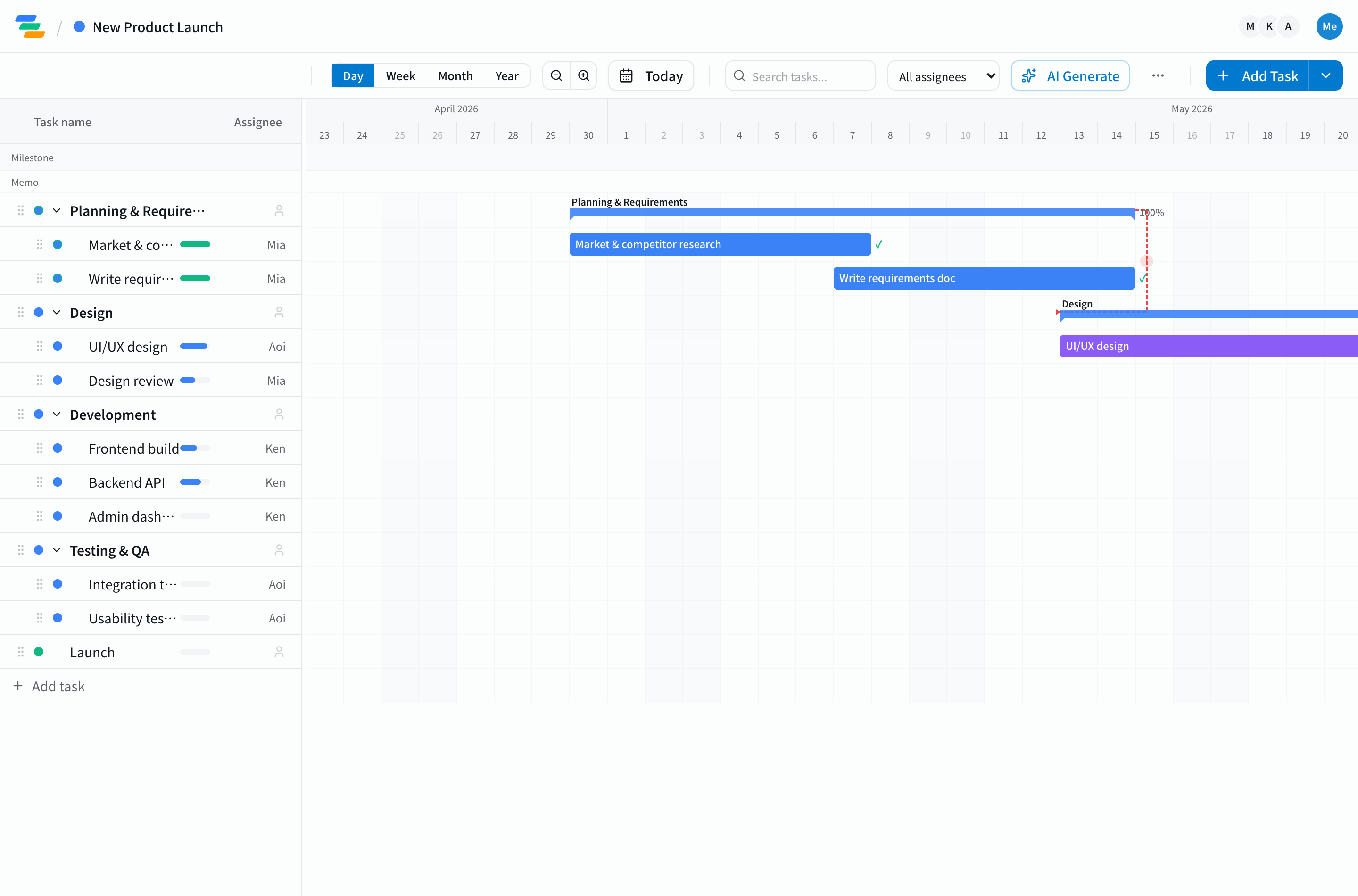
A Gantt chart is a visual timeline that displays project tasks as horizontal bars along a date axis. Each bar represents a single task: its left edge marks the start date, its right edge marks the end date, and its length corresponds to the duration. Tasks are stacked vertically, creating a complete picture of the project schedule at a glance.
The concept was developed by American mechanical engineer Henry Gantt in the 1910s. Over a century later, Gantt charts remain the standard scheduling tool across industries -- construction, software development, event planning, manufacturing, and more.
Anatomy of a Gantt Chart: 5 Key Elements
Before you start creating Gantt charts, you need to understand how to read them. Every Gantt chart is built from these five components:
- Task bars: Horizontal bars whose length represents duration. Longer bars mean longer tasks.
- Milestones: Diamond-shaped markers that highlight key dates -- phase completions, launch dates, or approval deadlines.
- Dependencies: Arrow lines connecting tasks to show sequential relationships. "Task A must finish before Task B can begin."
- Progress indicators: A filled portion inside each bar showing completion percentage. Half filled means 50% done.
- Assignees: Color coding or labels that show who is responsible for each task, making workload distribution visible at a glance.
How to Use a Gantt Chart: 3 Core Steps
Step 1: Break Down Work with a WBS
The first step is identifying every task your project requires. Use a Work Breakdown Structure (WBS) to decompose large deliverables into smaller, actionable items. For a website redesign, you might break it down into requirements gathering, UI design, front-end development, back-end development, QA testing, and launch.
The key principle: each task should take between one and five days. A task labeled "development" is too vague to track progress against. Instead, use specific items like "implement login flow" or "build product listing page."
Step 2: Define Dependencies and Estimate Durations
Organize tasks into sequences. Some can run in parallel (design and server setup), while others must happen in order (coding cannot start until design is approved). Setting dependencies correctly means that when one task shifts, downstream tasks adjust automatically. For a deeper dive, see our task dependency management guide.
For duration estimates, base them on data from similar past projects whenever possible. If a task is genuinely new, multiply your optimistic estimate by 1.5 to create a realistic buffer. This single habit prevents more schedule overruns than any other technique.
Step 3: Update Progress and Iterate
The most important Gantt chart practice is simple: keep it updated. Review progress at least once per week. When delays appear, analyze the root cause, decide whether to add resources or adjust scope, and update the chart accordingly. A Gantt chart that reflects reality is a decision-making tool. One that does not is just decoration.
Four Problems Gantt Charts Solve
- Schedule opacity: Every task, its duration, and its position in the sequence are visible on one screen. "What should we do next?" is always answered.
- Resource overload: Color-coding by assignee reveals when one person is carrying too many concurrent tasks.
- Status reporting overhead: Sharing the Gantt chart replaces lengthy written status reports. It is especially effective for executive updates.
- Misaligned expectations: When the entire team sees the same chart, deadlines and responsibilities are automatically understood without extra communication.
Practical Tips for Real-World Use
- Track the critical path: The longest chain of dependent tasks determines your project end date. If any task on this path slips, the whole project slips. Know where it is at all times.
- Pool buffers at the end: Rather than padding every task by a day, place a single buffer period before the final deadline. This approach, borrowed from Critical Chain Project Management, typically shortens overall timelines by 15-25%.
- Review in team meetings: Screen-sharing the Gantt chart during weekly standups builds a habit of accountability and surfaces problems before they escalate.
Getting Started Quickly
Understanding Gantt chart theory is one thing; building a chart from scratch is another. The task breakdown and scheduling work can easily consume hours. Tools like Ganty streamline this process: describe your project to the AI, and it generates a complete task list with estimated durations and dependencies. From there, you can drag and drop to fine-tune the plan and share it with your team in real time. A free plan is available, so you can try it on a real project with zero risk.
Related Articles
Gantt Chart Guide 2026: What It Is, How to Make One, Examples, Tools, and AI (Complete Guide)
Everything about Gantt charts in one place: what they are, how to make one in 5 steps, real examples, the right tool to pick, industry use cases, AI integration, and team operations. The definitive 2026 reference guide.
2026-04-08Burndown Chart Guide: How to Read, Create, and Use It Effectively
A complete guide to burndown charts: how to read them, create them, and use them effectively in agile projects, with real examples and pitfalls to avoid.
2026-03-24How to Create a Work Breakdown Structure (WBS): 5-Step Guide with Examples and Templates
How to make a Work Breakdown Structure in 5 steps, with industry-specific examples (IT, construction, marketing), Gantt chart integration, common pitfalls, and templates you can adapt today.